

How to use the mobile app to control the Ultra - Long LED Strip?
Wed 19,2025
Leave a message
In the dynamic world of lighting solutions, Ultra - Long LED Strips have emerged as a game - changer, offering unparalleled flexibility and creativity for both residential and commercial settings. As a leading supplier of Ultra - Long LED Strips, I am excited to share with you how you can use a mobile app to control these remarkable lighting products.
Understanding Ultra - Long LED Strips
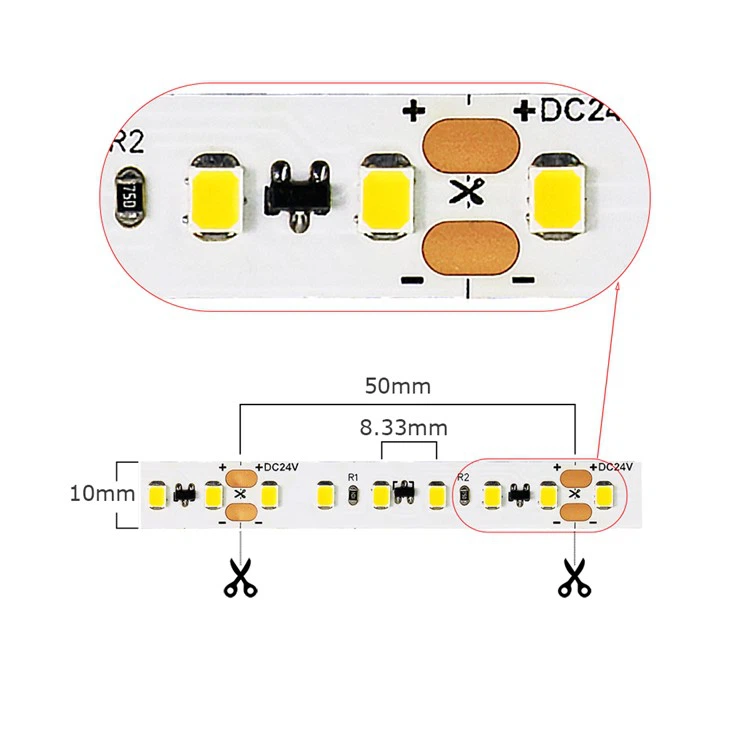
Before delving into the details of mobile app control, it's essential to understand what makes Ultra - Long LED Strips so special. These strips are designed to provide extended lighting coverage without the need for multiple shorter strips. They come in various lengths and densities, such as the Long LED Light Strips 60 LED and Long LED Light Strips 120 LED. The 60 - LED option offers a softer, more diffused light, perfect for creating a relaxing ambiance. On the other hand, the 120 - LED version provides a brighter and more intense illumination, suitable for areas that require high - level lighting.
The Advantages of Mobile App Control
Controlling your Ultra - Long LED Strips via a mobile app brings a host of benefits. Firstly, it offers unparalleled convenience. You can adjust the lighting settings from anywhere in your home or office, as long as your mobile device is connected to the same network as the LED strips. This means you can turn the lights on or off, change the color, adjust the brightness, and even set up lighting schedules without having to physically interact with the strips.
Secondly, mobile app control allows for a high degree of customization. Most apps come with a wide range of pre - set lighting scenes, such as party mode, reading mode, and relaxation mode. You can also create your own custom scenes by adjusting the color, brightness, and flashing patterns to suit your specific needs.
Steps to Connect Your LED Strips to the Mobile App
Step 1: Choose the Right App
The first step is to choose a mobile app that is compatible with your Ultra - Long LED Strips. Most of our LED strips are compatible with popular smart home apps that support LED strip control. You can usually find these apps on the App Store (for iOS devices) or the Google Play Store (for Android devices).
Step 2: Install and Set Up the App
Once you have downloaded the app, follow the on - screen instructions to install it on your mobile device. After installation, open the app and create an account if required. Some apps may also ask you to connect your mobile device to your home Wi - Fi network.
Step 3: Connect the LED Strips to the App
To connect your Ultra - Long LED Strips to the app, you need to put the strips into pairing mode. This is usually done by pressing a specific button on the LED strip controller for a few seconds until the indicator light starts flashing. Then, open the app and look for the option to add a new device. Select the LED strips from the list of available devices and follow the prompts to complete the pairing process.
Using the Mobile App to Control Your LED Strips
Adjusting Brightness
One of the most basic functions of the mobile app is to adjust the brightness of your LED strips. Most apps have a brightness slider that you can drag left or right to increase or decrease the light intensity. You can also set the brightness to a specific percentage if you prefer more precise control.
Changing Colors
Ultra - Long LED Strips are known for their ability to display a wide range of colors. With the mobile app, you can easily change the color of the strips to match your mood or the occasion. Most apps have a color wheel that allows you to select any color you want. You can also choose from a list of pre - set colors, such as red, green, blue, yellow, and purple.
Setting Up Lighting Scenes
As mentioned earlier, mobile app control offers a variety of pre - set lighting scenes. To use these scenes, simply select the desired scene from the app's menu. For example, if you want to create a party atmosphere, select the party mode, and the app will automatically adjust the color, brightness, and flashing patterns to create a vibrant and energetic lighting effect.
You can also create your own custom lighting scenes. To do this, adjust the color, brightness, and other settings to your liking, and then save the scene with a custom name. You can then easily recall this scene at any time.
Scheduling Lighting
Another useful feature of the mobile app is the ability to schedule your lighting. You can set the LED strips to turn on and off at specific times of the day. For example, you can set the lights to turn on in the morning to wake you up gently or turn off at night to help you sleep. This not only adds convenience but also helps to save energy.
Troubleshooting Common Issues
While using the mobile app to control your Ultra - Long LED Strips is generally a seamless experience, you may encounter some issues from time to time. Here are some common problems and their solutions:
Connectivity Issues
If you are having trouble connecting your LED strips to the app, first make sure that your mobile device and the LED strips are connected to the same Wi - Fi network. You can also try restarting both your mobile device and the LED strip controller. If the problem persists, check if there are any firmware updates available for the app or the LED strip controller.
App Crashes
If the app crashes frequently, try closing all other apps running on your mobile device to free up memory. You can also try uninstalling and reinstalling the app. If the problem still exists, contact the app's support team for further assistance.
Conclusion
Using a mobile app to control your Ultra - Long LED Strips offers a convenient, customizable, and energy - efficient way to light up your space. Whether you want to create a cozy atmosphere at home or a dynamic lighting display for a commercial event, the combination of Ultra - Long LED Strips and mobile app control gives you the power to transform any space with ease.
If you are interested in purchasing our Ultra - Long LED Strips or have any questions about using the mobile app for control, we encourage you to reach out to us for a detailed discussion. Our team of experts is always ready to assist you in finding the perfect lighting solution for your needs.
References
- "Smart Home Lighting: A Comprehensive Guide", Home Lighting Magazine, 2023
- "LED Strip Technology and Applications", Lighting Research Institute, 2022
